How to Create an Online Course for Workplace Training: A Complete Authoring Guide (2026)
Practical workplace e-learning authoring: measurable objectives, lesson sequencing, Innovito Studio slide types (media and serious games), SCORM export for LMS, Studio Deliver option, and QA before launch.
Workplace courses hold up when they are built around what people must do on the job—not around slides you already have. This guide walks through the same sequence we use with customers: clarify outcomes, sequence the path, then assemble in Innovito Studio with the slide types that match each beat. When you are ready to ship, you export SCORM for your LMS, publish via link, or add Studio Deliver if you want assignments and certificates inside Studio.
Who will get the most from this
Lock outcomes first
If the course goal is vague, every slide decision becomes subjective. Draft three to seven statements in terms of observable behavior (“After this module, the learner can…”) and note the evidence you will accept: scored quiz, branching path, signed checklist, or similar. Anything that cannot be evidenced should not be an objective.
What Innovito Studio is doing in your stack
Innovito Studio sits in the authoring layer: structured slide types, brand, narration (including AI voice where you want it), preview that mirrors export, then publish or SCORM packages. It is not trying to replace your HRIS; it reduces time-to-module and keeps interactive patterns consistent.
Slides are added from the template gallery—titles, heroes, text blocks, lists, timelines, comparisons, tabs, flashcards, and the interactive catalog. Pick by learning move, not by whichever layout “looks modern.”
Teaching slides: reduce noise
Use text, text-with-image, icon lists, definitions, comparisons, timelines, and process flows to carry the explanation load. For dense policies, accordion or tab layouts beat a wall of bullets. If you add AI voice-over, keep the spoken script aligned to on-screen text so captions, LMS players, and audits stay coherent.
Media: show the work
Use standard video when a clip carries most of the story. Motion Story works well when you need a tight visual metaphor—priority grids, quadrant models, step cards—without building custom motion graphics elsewhere. The 3D AI Avatar gives you a presenter-style delivery when filming a human is off the table but you still want a focal face and voice.
Interactive video
When learners must follow a sequence—safety, software, service recovery—use video-with-quizzes so the player stops at the moment of decision. Passive viewing rarely proves competence; a forced choice at the timestamp does.
Serious games: where they earn their place
Mission Asteroids, Knowledge Challenge, and Stack Challenge span different rhythms: short arcade bursts, ladder-style stakes, and precision checkpoints. Use them to break long modules, refresh compliance facts, or run product fluency drills—always tied to items you already validated elsewhere.
Sort Factory is ideal when learners must bucket items under pressure—operations triage, prioritization, policy categories. Memory Match handles pairs (terms–definitions, risk–control). Trivia Challenge and Spin the Wheel add time-bound or randomized review. Branching dialogue bridges games and scenarios: conversational choices with visible consequences.
Judgment: scenarios and dialogue
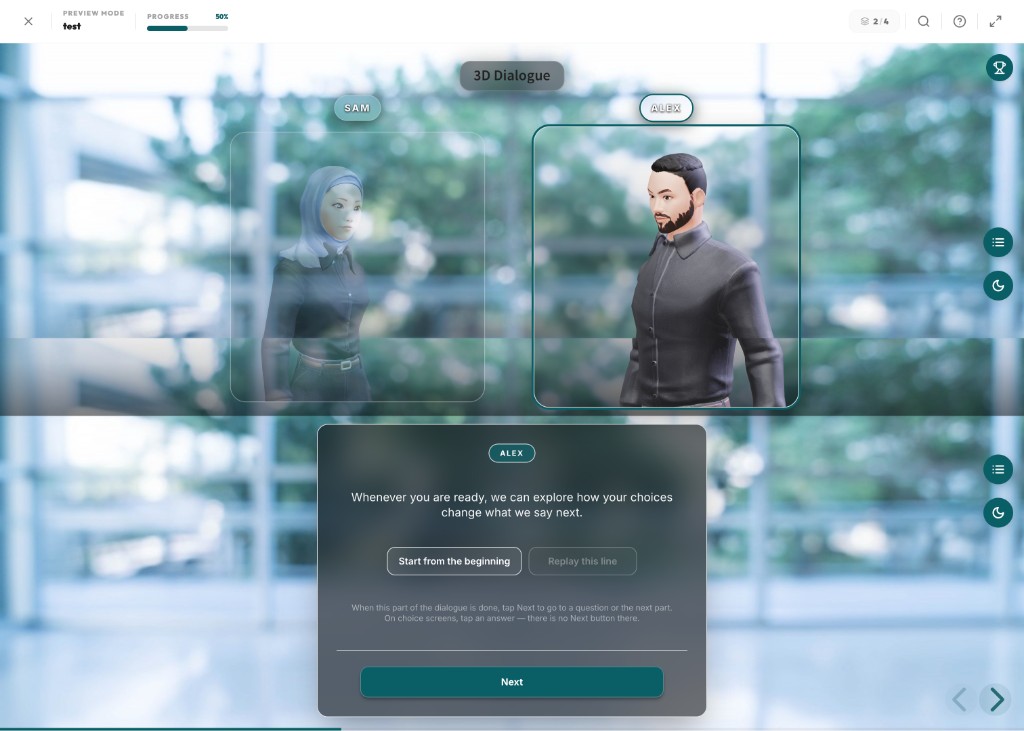
Branching scenarios, 3D Dialogue (dual avatars with clear turn-taking), role-play, and guided scenarios belong where the job requires tone, sequencing, or incomplete information. Studio preview lets SMEs experience branches the way learners will—use that session before you sign off.
Practice overlays and scored gates
Use matching, drag-and-drop, hotspots, fill-in-the-blank, flashcards, and polls so retrieval varies. Reserve formal quizzes, true–false gates, and scenario scoring for evidence you must defend in an audit. Distractors should invite misunderstanding of the job—not ambiguity in the wording.
SCORM in one paragraph
SCORM (Sharable Content Object Reference Model) is the packaging standard most enterprise LMS platforms still expect. Exporting SCORM from Innovito Studio produces a zip your administrators import; the LMS launches the player, records completion, scores, time-on-task, and suspend/resume data through the SCORM runtime.
- Manifest files describing structure for the LMS catalog.
- Assets (HTML/JS) that render slides, games, and media.
- Runtime bridges that post results back to the LMS gradebook.
1.2 versus 2004
1.2 remains common in large installed bases. 2004 offers richer sequencing semantics on platforms that implement it fully. Ask your LMS owner which variant they standardize on, upload once to staging, then bake that choice into your authoring checklist.
How the LMS consumes what you built
Typical flow: import to the content repository, attach to a course shell, assign audiences, enforce deadlines, pull completion reports. Innovito Studio covers authoring and packaging; the LMS remains the system of record for enrollment history until you intentionally move delivery elsewhere.
SCORM + your LMS
- Fits existing governance and SSO stacks.
- Central reporting stays where compliance already looks.
- IT owns player configuration you already tested.
- Best when procurement has standardized on a specific LMS vendor.
Studio Deliver add-on
- Assign cohorts from inside Innovito Studio.
- Track progress and catch stalled learners without exporting first.
- Issue branded certificates when you need proof without another login.
- Strong when you want one invoice for authoring + lightweight delivery.
Some analytics stacks also consume xAPI alongside SCORM. If your architecture team maintains a learning record store, confirm which exports they require—do not assume a dashboard will ingest everything automatically.
Quality checks before launch
Studio preview is your first defensive line for broken media paths, dead branches, and duplicated questions—run it before IT receives the zip.
Pitfalls we still see in review
- Slide-first authoring: jumping into templates before objectives exist.
- Games as initial policy delivery: fun scoreboards masking weak comprehension.
- Assuming SCORM fixes instructional gaps: packaging cannot rescue unclear intent.
- Skipping staging uploads: every LMS implements completion rules slightly differently.
Short answers
Close the loop
Ship one vertical slice: objective, media slide, serious game, scored quiz. Export SCORM, watch it complete in staging, then scale the pattern. The first end-to-end pass teaches you more than stacking untouched templates.