Eleven New Learning Slide Types for Objectives, Assessments, and Completion
Meet eleven new Innovito Studio learning slide types: objectives, assessments, case studies, email simulation, Likert scale, FAQ, callouts, and branded certificates. SCORM and xAPI export, Arabic RTL, and New badges in the slide gallery.
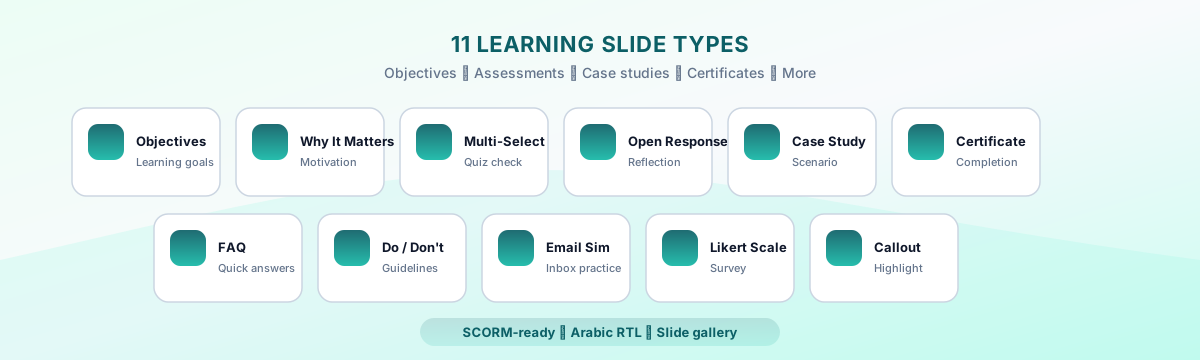
Corporate courses fall flat when every beat looks like a bullet list and every check feels like an afterthought. Innovito Studio now ships eleven purpose-built learning slide types—each with its own editor fields, learner preview, and SCORM export—so you can open with clear objectives, reinforce with realistic practice, and close with a certificate that matches your brand. They appear in the slide gallery with a New badge and work in English, Arabic RTL, and bilingual courses.
Objectives · Why It Matters · Multi-Select Quiz · Open Response · Case Study · FAQ · Email Simulation · Likert Scale · Callout · Certificate
Why instructional teams asked for dedicated learning slides
Generic text slides can carry policy, but they rarely signal intent. Learners wonder what they should remember, why the topic applies to their role, and how they will prove understanding. Assessment slides bolted onto the end feel disconnected from the narrative. These eleven types mirror how L&D teams actually storyboard: frame the lesson, teach, practice in context, check retention, and celebrate completion.
Before: one layout for everything
- Objectives buried in paragraph text
- Quizzes that look unlike the rest of the course
- Email or case scenarios rebuilt in PowerPoint
- Completion screens pasted from a template deck
Now: slides matched to the beat
- Objectives and Why It Matters slides up front
- Multi-Select Quiz, Open Response, and Likert Scale with consistent branding
- Email Simulation and Case Study with built-in interaction
- Certificate slide aligned to your colors and voice-over flow
Frame the lesson
Objectives
The Objectives slide lists what learners will be able to do after the module. Add a heading, optional subheading, and up to several goal lines—each can be flagged as measurable for audit-friendly compliance programs. The layout uses your brand accent, animates in cleanly, and supports voice-over like other content slides.
Why It Matters
Pair a headline with a short narrative and optional supporting points that explain relevance to the learner’s role, team, or region. It is the antidote to “read this because HR said so”—use it whenever adoption depends on motivation, not just awareness.
Callout
Choose a tone—note, warning, or success—and place a concise message learners cannot miss. Callouts work mid-lesson for policy exceptions, SLA reminders, or escalation paths that would get lost inside a bullet list.
Check understanding
Multi-Select Quiz
Author a question, several options, and feedback for correct and incorrect attempts. Learners must select all valid choices before continuing—completion is tracked when interactive completion is required. Export includes the same interaction logic your LMS expects from other Innovito quiz types.
Open Response
Set a prompt, optional character guidance, and a submit confirmation. Learners type their answer in the slide; responses can be reviewed offline or paired with facilitator-led sessions. The slide marks complete on submit so progress bars stay accurate.
Likert Scale
Define a statement, scale range (for example 1–5), and endpoint labels such as “Strongly disagree” and “Strongly agree.” After submission, learners see a thank-you state. Use it to surface sentiment before a change-management module or to benchmark confidence after practice.
Email Simulation
Fill in From, Subject, and body copy—then add a challenge question with multiple response options, each with optional feedback. The inbox chrome feels familiar, so learners practice judgment in a realistic context rather than abstract multiple-choice stems.
Teach with scenarios and reference
Case Study
Structure a narrative with background context, an optional challenge statement, analysis questions learners expand one by one, and key takeaways at the end. Completion triggers when learners engage with every question—ideal for leadership, finance, and operations programs where judgment matters more than recall.
FAQ
Stack question-and-answer pairs in an expandable list so learners self-serve common objections without leaving the course. Works well after a dense policy slide or before a final assessment.
undefined
List recommended behaviors in one column and pitfalls in another, each with a short explanation. The visual split beats a single paragraph of “avoid X but remember Y”—especially for code of conduct and bedside-manner training.
Close with recognition
Certificate
Celebrate completion with a framed certificate slide: custom heading, message, course title placeholder, badge label, and optional call-to-action. Brand colors flow from your course theme so the moment feels earned—not like a generic stock graphic pasted at the end.
Add them in Innovito Studio
Frequently asked questions
Ready to build a course that opens with objectives, practices in a realistic inbox, and ends on a branded certificate? Start a 14-day free trial in Innovito Studio, add your first learning slide from the gallery, and export to your LMS in minutes.